Flovi’s API uses API keys to authenticate all requests. You can create and manage your API keys in the Flovi Dashboard.
Getting Started 🚀
To authenticate with the Flovi API, follow these steps:
-
Generate an API Key
Go to the Customer Panel → Organization Settings and create a new API key. -
Authenticate Your Requests
Include your API key in theX-API-Keyheader of every request.
Security Best Practices
⚠️ Important: API keys provide full access to your Flovi data. Keep them secure.
Never expose your keys in:
- Public repositories (e.g., GitHub)
- Client-side code (e.g., frontend JavaScript)
- Anywhere unauthorized users might access them
🔒 Requirements
All requests must be made over HTTPS. Requests over plain HTTP or those missing authentication will be rejected.
https://api.go.flovi.io/customers/api
curl --location 'https://api.go.flovi.io/customers/api/schedule' \
    --header 'Content-Type: application/json' \
    --header 'X-API-Key: ••••••' \
    --data '{...}'
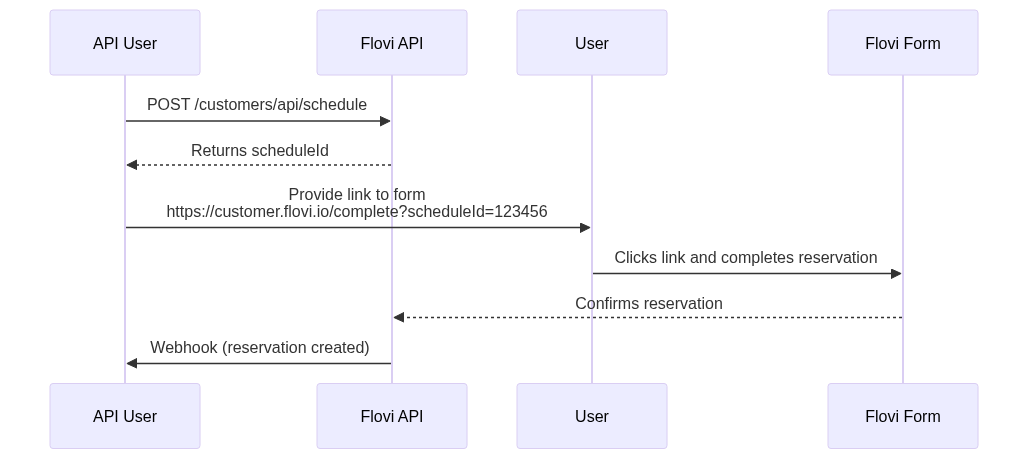
This guide outlines how to integrate your service with the Flovi API to enable users to schedule and complete reservations via a Flovi-hosted form, with webhook notifications sent back to your system.
Integration Flow
-
Create a Schedule
Your backend sends a POST request to:
POST https://api.go.flovi.io/customers/api/schedule
Flovi responds with a scheduleId. -
Send Link to User
You provide the user with a link:
https://customer.flovi.fi/complete?scheduleId=123456
The user completes the form on Flovi’s side. -
Receive Webhook
Once completed, Flovi sends a webhook to your backend with reservation details. more
🔒 Requirements
- API Key from Flovi
- Public HTTPS webhook endpoint
- Optional: validate webhook signature for security
Status Codes
200 OK– Request was executed successfully.400 Bad Request– Missing or invalid parameters.401 Unauthorized– Authentication failed or API key is missing.404 Not Found– The specified route could not be found.500 Internal Server Error– An error occurred on the server.
{
    "message": "Invalid API key"
}
Returns a list of all offices associated with your organization.
Response
A successful response will return a JSON array of office objects. Each object contains the following fields:
id(string): Unique identifier for the office.name(string): The display name of the office.
Status Codes
200 OK– Request was successful and the list of offices is returned.401 Unauthorized– Authentication failed or API key is missing.403 Forbidden– You do not have access to this resource.500 Internal Server Error– An error occurred on the server.
curl --location 'https://api.go.flovi.io/customers/api/offices' \
--header 'Content-Type: application/json' \
--header 'X-API-Key: ••••••'
[
    {
        "id": "1",
        "name": "Office 1"
    },
    {
        "id": "2",
        "name": "Office 2"
    }
]
Retrieves the schedule information for a given route and departure time.
JSON Body
reservationType(string, required): One of the following: officeToOffice, homeDelivery, serviceDrive, purchaseCar, replacementCar.originType(string, required): One of the following: ownOffices, otherPlace, homeAddress.originOfficeId(string, required when ownOffices) Flovi office id. Office must be found from database. You can get office id with endpoint offices.originAddress(string, required when otherPlace or homeAddress): Full address in format "street number, zip city, country (FI,SE)" ie. "Street 12, 00100 Helsinki, FI"destinationType(string, required): One of the following: ownOffices, otherPlace, homeAddress.destinationAddress(string, required when otherPlace or homeAddress): Full address in format "street number, zip city, country (FI,SE)" ie. "Street 12, 00100 Helsinki, FI"testPlates(boolean, optional): If car needs to be transfered with test plates or not. This will add 2 hours for the schedule when set true.depart(ISO 8601 datetime in UTC0 timezone, required): When the car can be picked up.
Response
A successful response will return a JSON object containing schedule bounds:
depart_at_earliest(ISO 8601 datetime in UTC0 timezone): The earliest possible departure time for the given route.depart_at_latest(ISO 8601 datetime in UTC0 timezone): The latest possible departure time for the given route.arrive_at_earliest(ISO 8601 datetime in UTC0 timezone): The earliest possible arrival time for the given route.arrive_at_latest(ISO 8601 datetime in UTC0 timezone): The latest possible arrival time for the given route.
Status Codes
200 OK– Schedule was successfully retrieved.400 Bad Request– Missing or invalid parameters.401 Unauthorized– Authentication failed or API key is missing.404 Not Found– The specified route could not be found.500 Internal Server Error– An error occurred on the server.
curl --location 'https://api.go.flovi.io/customers/api/schedule' \
--header 'Content-Type: application/json' \
--header 'X-API-Key: ••••••' \
--data '{
    "reservationType": "officeToOffice",
    "originType": "ownOffices",
    "originOfficeId": 1,
    "destinationType": "ownOffices",
    "destinationOfficeId": 1,
    "testPlates": false,
    "depart": "2025-04-23T12:00:00"
}'
{
    "scheduleId": "20e84ce3-9c39-4bbe-a28a-aee87180157f",
    "departAtEarliest": "2025-04-23T12:00:00.000000Z",
    "departAtLatest": "2025-04-24T18:00:00.000000Z",
    "arriveAtEarliest": "2025-04-23T12:00:00.000000Z",
    "arriveAtLatest": "2025-04-24T18:00:00.000000Z",
}
Flovi supports webhooks to notify your application in real-time about important events. This allows your system to react to changes automatically without polling the API.
Creating Webhooks
Go to https://customer.flovi.io/organisation/settings, click on Webhooks -> Add. Enter your desired URL and choose the events you want to subscribe to.
Webhook: reservation_status_change
The reservation_status_change webhook is triggered whenever the status of a reservation is updated.
Supported Events
This webhook may be triggered for the following events:
created- A reservation has been created.taken– All the drives in reservation has assigned.driving– The driver has started driving.sealed– The reservation is completed and sealed.final_costs- After two weeks of reservation sealing webhook is called to inform total costs. Format is the same as state:sealed, but also includesvehiclesinformation.cancelled- The reservation is cancelled.
Cancelled event also adds
cancellation_reasonfield. Possible reasons are: DOUBLE_BOOKING,NO_DRIVER_WAS_FOUND, DRIVER_CANCELED_OR_NOT_ARRIVED, SCHEDULE_ISSUE, DRIVER_WAS_FOUND_THROUGH_ANOTHER_WAY, UNTRANSPORTABLE_VEHICLE and OTHER_REASON
Webhook Security
To ensure the authenticity of incoming webhook requests, each request includes a signature header that can be used to verify the request was sent by Flovi.
Secret & Signature
When you configure a webhook endpoint, you'll receive a webhook secret. This secret is used to sign each payload using HMAC SHA256.
- Header:
x-hub-signature - Signature Method: HMAC SHA256
- Secret: Provided in the Flovi Dashboard
Calculating Signature
To verify that a webhook request is legitimate, you can compute the HMAC SHA256 signature of the request body using your webhook secret. Here's how to calculate the signature:
-
Obtain the webhook secret
You can find your secret in the Flovi Dashboard. Keep it safe and never expose it publicly. -
Extract the request body
Read the raw request body exactly as it was received, without any modifications. -
Compute the HMAC SHA256 hash
Use the webhook secret as the key and the raw request body as the message. The output should be a lowercase hexadecimal string. -
Compare with the
x-hub-signatureheader
The signature sent by Flovi is included in thex-hub-signatureheader. Compare it against your computed hash to confirm authenticity.
Example (in Node.js)
const crypto = require("crypto");

function computeSignature(secret, rawBody) {
  return crypto
    .createHmac("sha256", secret)
    .update(rawBody, "utf8")
    .digest("hex");
}
content-length	16
x-hub-signature	sha256=981c0223305427406b22a4694022562be103419c89e31ee06de2dd9f96f92238
content-type	application/json
user-agent	    GuzzleHttp/7
host	        webhook.site
{
  "reservation": 34,
  "event": "reservation_state_changed",
  "external_id": null,
  "driver": {
    "name": "test driver",
    "phone": "+358123456789",
    "freelancer": true
  },
  "origin": {
    "address": "Maininkitie 2",
    "zip": "02130",
    "city": "Espoo",
    "country": "FI",
    "latitude": 60.2055,
    "longitude": 24.6559
  },
  "destination": {
    "address": "Mannerheimintie 437",
    "zip": "00130",
    "city": "Helsinki",
    "country": "FI",
    "latitude": 60.2055,
    "longitude": 24.6559
  },
  "state": "created"
}
{
  "reservation": 34,
  "event": "reservation_state_changed",
  "external_id": null,
  "driver": {
    "name": "test driver",
    "phone": "+358123456789"
  },
  "origin": {
    "address": "Maininkitie 2",
    "zip": "02130",
    "city": "Espoo",
    "country": "FI",
    "latitude": 60.2055,
    "longitude": 24.6559
  },
  "destination": {
    "address": "Mannerheimintie 437",
    "zip": "00130",
    "city": "Helsinki",
    "country": "FI",
    "latitude": 60.2055,
    "longitude": 24.6559
  },
  "costs": {
    "breakdown": [
      {
        "type": "drive",
        "summary": "Espoo-Helsinki",
        "price": 12
      },
      {
        "type": "handover",
        "summary": "Handover to customer",
        "price": 11
      }
    ],
    "total": 23,
    "currency": "EUR"
  },
  "state": "sealed"
}
{
  "reservation": 34,
  "event": "reservation_state_changed",
  "external_id": null,
  "driver": {
    "name": "test driver",
    "phone": "+358123456789"
  },
  "origin": {
    "address": "Maininkitie 2",
    "zip": "02130",
    "city": "Espoo",
    "country": "FI",
    "latitude": 60.2055,
    "longitude": 24.6559
  },
  "destination": {
    "address": "Mannerheimintie 437",
    "zip": "00130",
    "city": "Helsinki",
    "country": "FI",
    "latitude": 60.2055,
    "longitude": 24.6559
  },
  "costs": {
    "breakdown": [
      {
        "type": "drive",
        "summary": "Espoo-Helsinki",
        "price": 12
      },
      {
        "type": "handover",
        "summary": "Handover to customer",
        "price": 11
      }
    ],
    "total": 23,
    "currency": "EUR"
  },
  "vehicles": [
    {
      "license_plate": "ABC-123",
      "make": "Tesla",
      "model": "Model 3",
      "year": 2021
    }
  ],
  "state": "final_costs"
}
{
  "reservation": 34,
  "event": "reservation_state_changed",
  "external_id": null,
  "driver": {..},
  "origin": {..},
  "destination": {..},
  "state": "cancelled",
  "cancellation_reason": {
    "reason": "NO_DRIVER_WAS_FOUND",
    "comment": "free text"
  }
}